Tuesday, October 21, 2014

Lingoes 灵格斯词霸


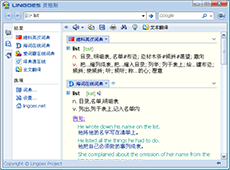
是一款简明易用的词典和文本翻译软件,支持全球超过60多个国家语言的词典查询和全文翻译、支持屏幕取词、索引提示和语音朗读功能,并提供海量词库免费下载,是新一代的词典与文本翻译专家。
灵格斯提供了最直观的使用方法,帮助你快速查询包括英语、法语、德语、西班牙语、意大利语、俄语、中文、日语、韩语在内的60多种语言的翻译结果。使用灵格斯创新的屏幕取词功能,您只需将鼠标移动到屏幕中的任何有单词的位置,按下取词键,灵格斯就能智能地识别出该单词的内容及其所属的语言,即时显示出相应的翻译结果。并且这一切都不会干扰你当前正在进行的工作。

灵格斯拥有当前主流商业词典软件的全部功能,并创新地引入了跨语言内核设计及开放式的词典管理方案,同时还提供了大量语言词典和词汇表下载,是学习各国语言,了解世界的最佳工具。

Magical Jelly Bean Keyfinder


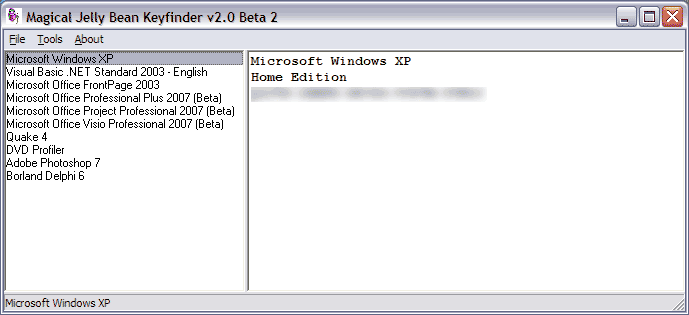
The Magical Jelly Bean Keyfinder is a freeware open source utility that retrieves your Product Key (cd key) used to install Windows from your registry. It allows you to print or save your keys for safekeeping. It works on Windows 95, 98, ME, 2000, XP, Vista, Server 2003, Server 2008, Office XP, Office 2003, and Office 2007 family of products. It also has a community-updated configuration file that retrieves product keys for many other applications. Another feature is the ability to retrieve product keys from unbootable Windows installations.

Notepad++

Notepad++ is a free source code editor (and Notepad replacement), which supports several programming languages, running under the MS Windows environment.

This project, based on the Scintilla edit component (a very powerful editor component), written in C++ with pure win32 api and STL (that ensures the higher execution speed and smaller size of the program), is under the GPL Licence.

This project is mature. However, as you can see it's a one-man-project, there are still some bugs and missing features. If you have any question or suggestion about this project, please post them on the forums. As well, if you have any feature requests, you can always make the demand, but there's no guarantee that I'll implement it.

Features:

  • Syntax Highlighting and Syntax Folding
  • WYSIWYG
  • User Defined Syntax Highlighting
  • Auto-completion
  • Multi-Document
  • Multi-View
  • Regular Expression Search/Replace supported
  • Full Drag 'N' Drop supported
  • Dynamic position of Views
  • File Status Auto-detection
  • Zoom in and zoom out
  • Multi-Language environment supported
  • Bookmark
  • Brace and Indent guideline Highlighting
  • Macro recording and playback

KDiff3 - file & directory diff and merge tool


KDiff3 is a program that:

  • compares or merges two or three text input files or directories,
  • shows the differences line by line and character by character (!),
  • provides an automatic merge-facility and
  • an integrated editor for comfortable solving of merge-conflicts,
  • supports Unicode, UTF-8 and other codecs, autodetection via byte-order-mark "BOM"
  • supports KIO on KDE (allows accessing ftp, sftp, fish, smb etc.),
  • Printing of differences,
  • Manual alignment of lines,
  • Automatic merging of version control history ($Log$),
  • and has an intuitive graphical user interface.
  • Windows-Explorer integration Diff-Ext-for-KDiff3 - shell extension included in installer (originally by Sergey Zorin: see also Diff Ext)
  • KDE-Konqueror service menu plugin
  • Simplified integration with IBM-Rational-Clearcase for Windows
  • Read what else is special in a short abstract (PDF).
  • Sunday, September 14, 2014

    HyperSnap 7.15.00 Full Reg Key ( Activator )

    HyperSnap 7.15.00 Full Reg Key ( Activator )

    HyperSnap 7.15.00 Full Version - Merupakan software screen capture yang berfungsi untuk mengambil gambar pada layar pc kita dengan gambar berkualitas HQ. HyperSnap 7.15.00 full versi dapat juga di katakan sebagai gabungan antara screen capture dan image editor, karena selain handal dalam mengambil screenshot di layar pc kita, HyperSnap juga memiliki fitur image editor yang super lengkap. Software ini tentu saja sangat di rekomendasikan bagi anda dalam membuat tutorial online, handout pelatihan, presentasi, halaman web, materi pemasaran dan segala macam hal yang berhubungan dengan capture mengcapture layar desktop.

    Screenshot

    New Features
    • New user interface, using Ribbon instead of menu and toolbars. However you can still switch to the old menu/toolbars interface if you want. We recommend that you give try to the new UI though, as some features are not available or more difficult to access with the old interface.
    • Big enhancements to HyperSnap drawing editor - all shapes drawn are now kept as separate objects. You may select them at any time, move, modify, delete. You may also imprint them permanently on the image at any time.
    • New shapes in drawing editor - different types of callouts, arc, opened and closed polylines. When needed, you may switch to "draw directly on image" mode. This could be useful e.g. to edit small icons, where each pixel counts, while for bigger images we recommend the new shape drawing mode.
    • New native HyperSnap file format .dhs - preserves the drawn shapes as separate objects for later editing.
    • Support for opacity (alpha channel) - any part of an image can be made completely or partially transparent.
    • A much enhanced color picker on the Ribbon "Edit" tab - select colors from standard palette, define up to 8 user colors, switch between using the foreground/line color or background/fill color, pick color form anywhere on the screen, set RGB or HSL color codes with sliders or by typing values, displays and offers a quick copy of HTML color code like #E6C01A, "pin" colors to use the same colors in all editied images or have separate selections for each image and more.
    • Optional thumbnail list showing small previews of all images captured or opened in HyperSnap window. Click on thumbnails to switch the big window to that image. Select multiple images in Thumbnails View window, then right click to apply group operations on selected images, e.g. resize them, print, save to one multi-page file (TIFF or PDF) or to separate image files in one operation.
    • Save images to PDF files. Can also open PDF files created with HyperSnap 7, but not other PDFs.
    • Region capture enhancements - select unrestrained or pre-defined aspect ratio of captured region (e.g. 4:3, 16:9 or user defined), select a pre-defined fixed size of captured region, e.g. 640x480 pixels, and move it around the screen.
    • Support for FireFox 4 and newer with FireFox add-on to capture entire pages etc.
    • Many more smaller enhancements.

    Wednesday, September 10, 2014

    Ocster Backup Pro 7.16 Full Serial Key

    Ocster Backup Pro 7.16 Full Serial Key
    & nbsp;Mirrors: HugeFiles | BillionUploads | TusFiles

    Ocster Backup Pro 7 Full Version - Adalah sebuah software yang berfungsi untuk melakukan backup data secara otomatis yang mendukung backup PC lengkap (backup image), file backup, backup email (Outlook, Thunderbird), browser cadangan (Firefox, Chrome, Internet Explorer) dan backup contact. Software ini sangat mudah digunakan dan hasil backup yang dilakukan oleh Ocster Backup pro dapat di simpan pada local drive, removable drive (Flash Disk, harddisk external dll) atau pada server Ocster backup yang aman.

    Screenshot
    Like its predecessor, Ocster Backup Pro 7 continues the focus on being a fully automatic and easy to use backup solution, while at the same time improving in lots of areas. For example, Ocster Backup Pro 6 amazes with an up to 600% faster backup speed* compared to the previous version. In addition, new features like 1 to 1 File Copy, i.e. simple mirroring of files to other media without packing in archives, backup of Internet Explorer and Mozilla Firefox bookmarks, backup of the Windows contacts in Windows 7 and Vista and the ability for backing up emails and calendars from Microsoft Outlook and Mozilla Thunderbird impressively extend the feature set in Ocster Backup Pro 7.

    Features
    • Fully Automatic: Creates fully automatic backups of your data
    • Easy to use
    • Fast backup speed
    • Includes alternative backup format: 1 : 1 File Copy - simple mirroring of files to other media
    • Internet Explorer bookmarks
    • Mozilla Firefox: Backs up bookmarks, settings and add-ons
    • Mozilla Thunderbird: Backup emails, calenders, settings and add-ons
    • Windows contacts: Backup the Windows Contacts folder.
    • "New Backup-Rules" More choice with extended filtering capabilities
    • Versioning: Easily access and restore different older versions of your files.
    • Automatic Pausing: Backups are done in the background and are automatically paused to prevent them from slowing down other programs. Various system characteristics are monitored, e.g. CPU usage, I/O usage, fullscreen applications, etc.
    • Outlook/Thunderbird Support: Back up your Microsoft Outlook/Thunderbird emails and calendars with a single mouse click.
    • Stop & amp; Resume: Backups can be stopped and resumed. This is handy when the computer needs to be shut down, for example.
    • Backup Reports: Detailed backup reports can be generated each time the backup is updated. The contents of the reports can be configured.
    • Backup Report Emails: Backup reports can be automatically sent to an email address. That way you can be up-to-date on the state of your backups even when you are on a business trip or if the computer is simply a server in your attic.
    • Network support: Files and folders on network drives can also be backed up. The backup data can also be stored on network drives if that is desired.
    • Encryption: Backups are strongly encrypted and protected with a user password. The encryption algorithm can be configured, if that is desired.
    • Compression: Backups are compressed intelligently to save space. Different compression types are available: from fast ones with moderate compression to slower ones with excellent compression.
    • Scheduled: Backups can be started either automatically at scheduled times or manually by clicking a button.
    • Storage Types: Backups can be stored on hard disk, USB sticks, network drives and Ocster Secure Storage.
    • Supports Ocster Secure Storage:
    • Stores the files in professional data centers
    • Much safer than using hard disks or USB sticks
    • The backups are protected against fire, water damage, lightning, theft, hurricanes, ...
    • Multiple copies are kept in different locations
    • The data is transmitted to the data centers via a highly secured internet channel
    • Available for a small subscription fee.
    • Incremental backup: after an initial full backup only the changes to the previous state are stored. This saves space and reduces transfer times.
    • Open File Support: Files and folders that are in use can be backed up as well.
    • Hard Link and Symbolic Link Support: Hard links and symbolic links can be backed up and are properly restored as hard links and symbolic links.
    • Special Files: Compressed, encrypted and sparse files can also be backed up.
    • Encryption Algorithms: Backup can be encrypted the following algithms: AES 256 Bit, AES 128 Bit, BlowFish, Cast-128
    • Compression Algorithms: The software supports the following compression types: ZLib, LZMA Quick, LZMA Normal, LZMA Best
    • Small File Optimization: Through smart uses of compression the software can achieve high compression rates, even with many small files.

    Link Download
    Mirror via BillionUploads
    Mirror via HugeFiles
    Mirror via TusFiles
    Password: koskomputer.blogspot.com

    Cara Install
    1. Unrar
    2. Instal Ocster Backup Pro & amp; Run programnya
    3. Click "Help" & gt; Click "Buy / Enter Unlock Code" & gt; "Click Here to Unlock"
    4. Masukan serial key-nya
    5. Enjoy

    FastStone Capture 5.3


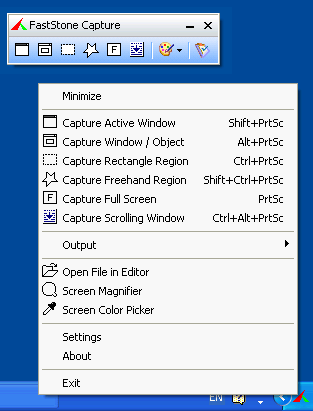
    FastStone Capture is a powerful, flexible and intuitive screen-capture utility. It allows you to capture anything on the screen including windows, objects, full screen, rectangle regions, freehand-selected regions and scrolling windows/web pages. It has innovative features such as a floating Capture Panel, hotkeys, resizing, cropping, text annotation, printing, e-mailing, screen magnifier and many more.


    Features:
    • A small floating Capture Panel that can be dragged anywhere or minimized to the Windows tray area
    • Resource friendly - uses a very small amount of memory, especially when minimized to the Windows tray area
    • Global hotkeys to activate the program's capture capabilities anytime, anywhere
    • Efficient tools to capture windows, objects, full screen, rectangle/freehand-selected regions and scrolling areas
    • Capture web pages in Microsoft Internet Explorer, FireFox and Opera
    • Option to specify destination (internal editor, clipboard or file) where the captured image will be sent
    • Screen color picker
    • Text/Arrowed line/Highlight/Watermark annotation
    • Drop-shadow, torn-edge effects
    • Add comments
    • Resize, crop, brightness, contrast, gamma, sharpen, blur, gray, negative
    • Zoom in/out
    • Undo/Redo
    • Save as BMP, JPEG, JPEG2000, PNG, GIF, TIFF, TGA, PDF
    • Send captured images in e-mails
    • Screen Magnifier
    • Divide it into multi-pages when printing long document
    • Multi-monitor support
    • Option to run when Windows starts
    • And many more ...